

Dynamic one
Dynamic one

Top rated by 500+ clients

★★★★★

Pesticide Shop Software

Running a pesticide Shop business comes with its unique challenges. Managing daily transactions, controlling accounts, tracking stock, monitoring sales, processing payments, and keeping up with batch numbers and expiry dates can be overwhelming. However, there's good news! A groundbreaking solution exists to alleviate these burdens and help you effectively manage your pesticide business. Introducing our software solution tailored specifically for the pesticide industry. We have reliable pesticide shop software that helps you to manage daily activities.

How to take more benifits from software ( Must Read )

Assalamualaikum Dear User, First of all, thank you for using our software. We have created a complete training series to ensure that our clients can take proper benefits from our software.To get the maximum benefit from this software, you are requested to carefully follow the guidelines.

1 - Using software step by step

2 - Add opening carefully in a better way

4 - Maintain daily cash

7 - Taking data backup properly

3 - Add daily transection carefully

5 - Regularly check and balance stock and account balances

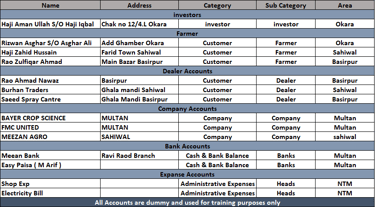
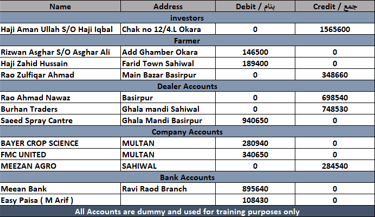
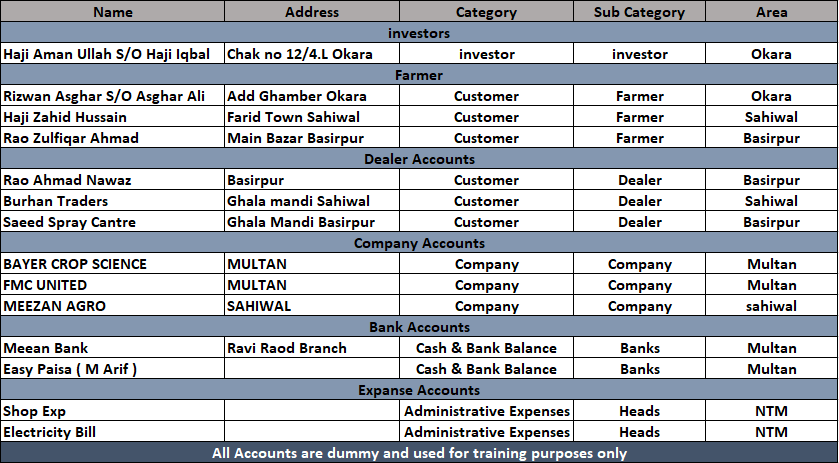
  • First of all create all accounts in software which have any balance ( Debit or Credit ). You have to create all accounts like farmer, dealers, companies, banks, employes, expanses and select correct catagory. batter you can create a manual list of account as we show in picture and then add these accounts into software.

  • Add all companies in the software whose products you currently have in stock.

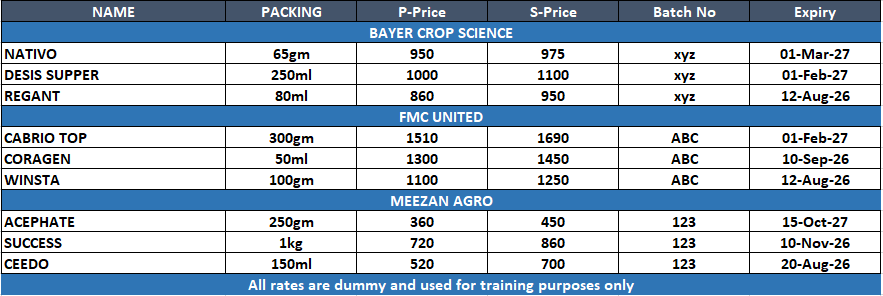
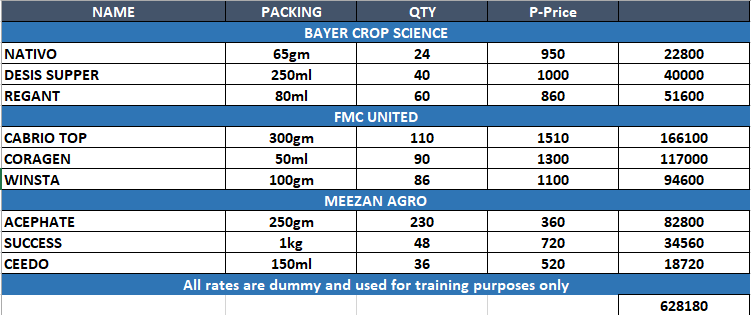
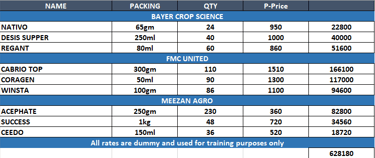
  • Create all these products & batch numbers in software that you have in stock. batter you can create a manual list as we shown in picture. it will helps you to enter data properly. by creating a munal list you will be more confident.

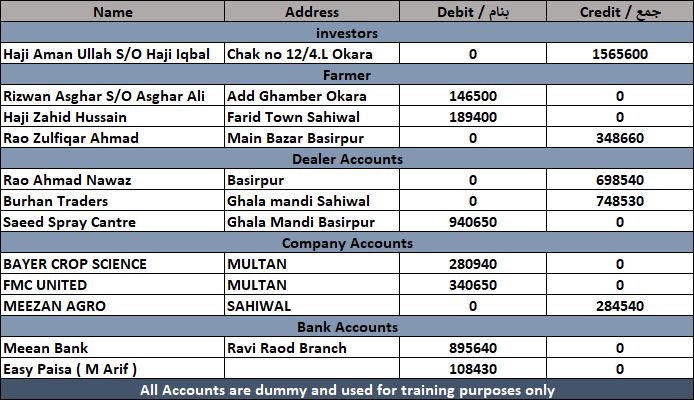
  • Add opening balance carefully. before adding balances create a manual list of all account balance as we shown in picture and add balance according to that list. by creating a list you will be able to add correct balance of all account. after that you can verfiy software figures to that manul list.

  • Add opening stock carefully. before adding stock create a manual list of all prduct that you have in stock and add stock according to that list. by creating a list you will be able to add correct quantity of all products. after that you can verfiy software figures to that manul list.

  • After adding the opening balances and stock, enter your daily transactions carefully. Record all payments and receipts, as well as daily purchases and sales. Please manage and update your daily transactions regularly in a well-organized manner.

  • After adding all daily transactions, check that your cash in hand is accurate. Daily verification of cash in hand will help you avoid mistakes in your cash entries. And creating a list of cash notes in software is a good habit.

  • Check you daybook daily and verifiy all your daily entries. if you found any mistake correct at same time. do not post your work on next day. For verification you can use daybook & Recheck option in software.

  • Regularly check and balance your stock and account balances to ensure that all records in the software remain accurate and up to date. Compare the stock available in the system with the physical stock in your store or warehouse to make sure there are no differences. In the same way, review your account balances, including payable and receivable amounts, to confirm that all transactions have been entered correctly.

6 - Use locking system to avoid mistakes

  • After adding all daily transactions and verifying the daily data, make it a good practice to lock all previous records. Locking completed records helps prevent accidental edits, deletions, or mistakes in the data. This practice ensures that your previous transactions remain secure and your financial records stay accurate and reliable

  • Always maintain a proper backup of your software data. Regular data backups help protect your important records from system crashes, accidental deletions, or other unexpected problems. It is recommended to store backups in a secure location, such as an external drive or cloud storage, to ensure your data remains safe and recoverable.