

Top rated by 500+ clients
★★★★★
Pesticide Shop Software
Running a pesticide Shop business comes with its unique challenges. Managing daily transactions, controlling accounts, tracking stock, monitoring sales, processing payments, and keeping up with batch numbers and expiry dates can be overwhelming. However, there's good news! A groundbreaking solution exists to alleviate these burdens and help you effectively manage your pesticide business. Introducing our software solution tailored specifically for the pesticide industry. We have reliable pesticide shop software that helps you to manage daily activities.
How to add & manage accounts in new account

1 - How to Add Account
3 - How to Delete Account
2 - How to Edit Account
Dear User,
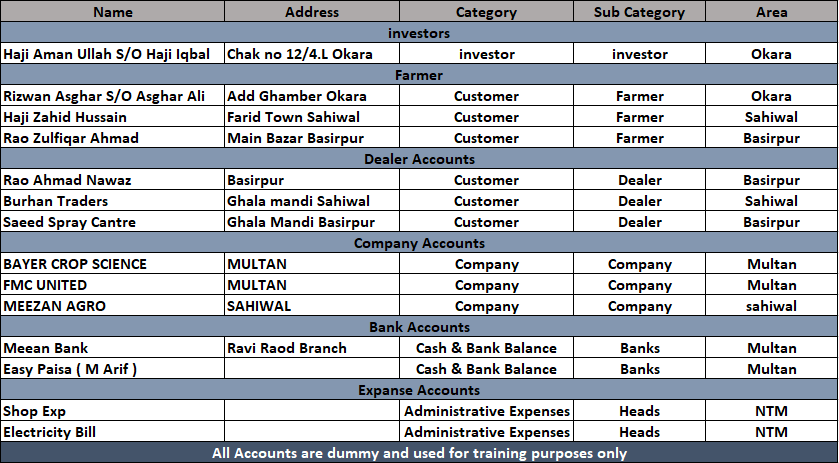
Before adding accounts to the software, it is recommended to first prepare a manual list of all accounts as shown in the picture. This practice helps avoid mistakes and prevents duplicate entries.Add all accounts such as Farmers, Dealers, Companies, Banks, Employees, and Expense accounts in this section. Please ensure that the correct category and sub-category are selected to maintain proper account organization.


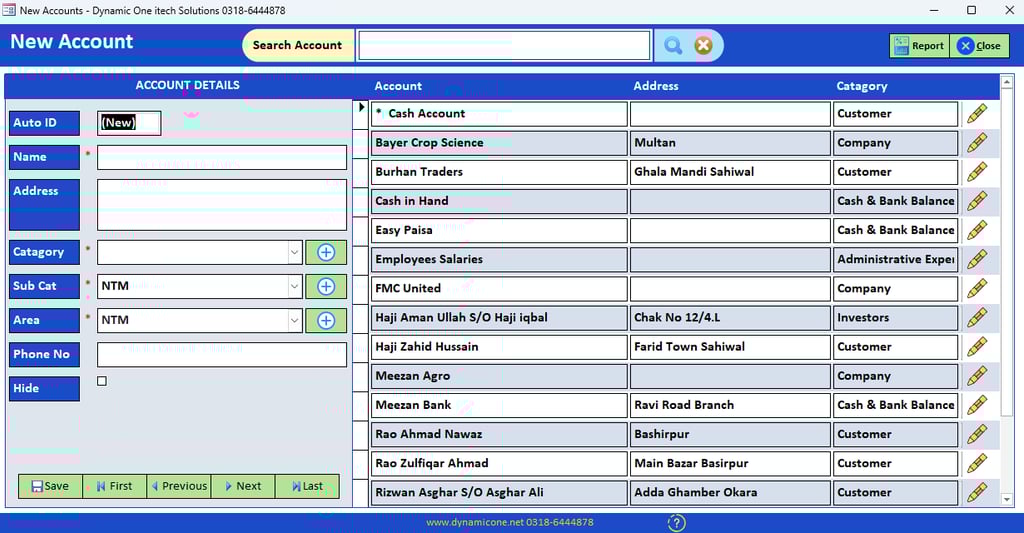
To add an account in software goto accounts menu then press new account button. you will see new acconts form.


Enter Account Name Like ( Haji Zahid Hussain , Burhan Traders, FMC United, Meezan Bank )
Enter Account Address if avaible. For Bank Account you can add Branch address Like Ravi Road Branch. For Companies account you can add Company wharehouse address or head office like multan.
Enter Account catagory & Sub Catagory carefully. Catagories & Sub Catagories are show in picture and you can add more if required by pressing + Sign.
Enter Account Area if you want to manage accounts areawise. it help you to get you reports more orgnized form. You can add multiple areas by press + sign next to area filed. if you dont want to manage areas you can skip this column by default it remains NTM ( Not Mantion ).
Enter Account phone number. You can add more multiple number as (0318-6444878 / 0332-6444877 ) and you can add like this for example i have a dealer Burhan Traders ( M Arif 0318-6444878 / M Waris 0332-6444877 )
Hide mark will remain untick on adding account. you can you this if you want to hide any account in future. This will hide you account form all of you transections voucher like payment, reciept, purchase, sale.
To edit any account you will see a pencil icon Called ( Option Button ) with every account. By pressing option buttion a dropdown list will apre with these options ( Edit, Delete, Print Ledger ). Click edit and All account information will apear on adding section.
Edit any data you want like Name, Address, Catagory, Sub Cat, Phone No and then Click save.
To delete any account you will see a pencil icon Called ( Option Button ) with every account. By pressing option buttion a dropdown list will apre with these options ( Edit, Delete, Print Ledger ). Click delete and you will see a confirmation dailog box.
Enter Software password and click delete to delete account. To cancel this action press close.
How to add & Manage accounts in edit accounts

1 - How to Add Account
2 - How to Edit Account
3 - How to Delete Account
Dear User,
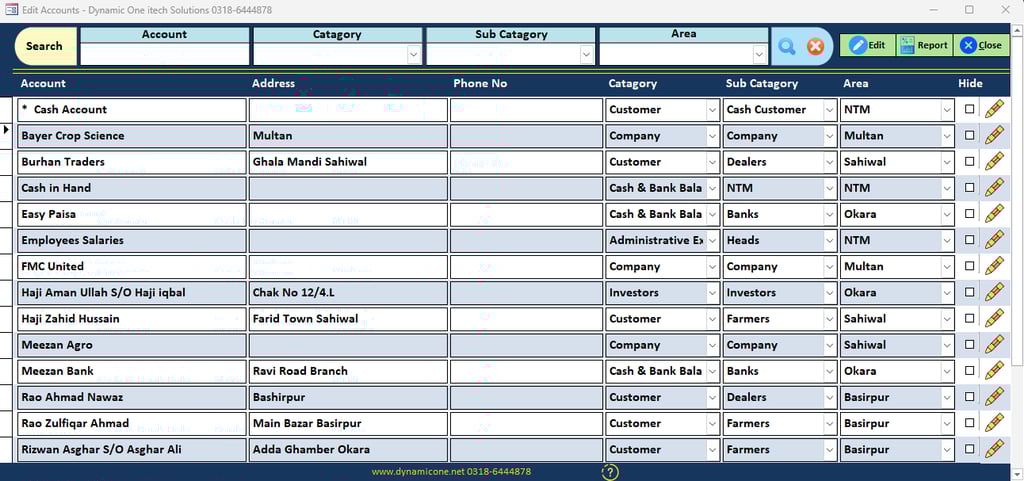
You Can add accounts in edit accounts section. goto Account menu and click edit accounts. you will see edit account form. When you open this form it open in locked position. you can not Add or edit account directly.


To add accounts in edit accounts form you need to allow editing on this form by clicking edit button on this form. Once you click edit you will see dialog box asking for password. Enter system password and click unlock button. after that you will se a massage " Editing is enabled on edit accounts form ".
click vertical scrol bar and drag it to last record. you will see an empty line just click on name filed and start entering data.
Enter Account Name Like ( Haji Zahid Hussain , Burhan Traders, FMC United, Meezan Bank )
Enter Account Address if avaible. For Bank Account you can add Branch address Like Ravi Road Branch. For Companies account you can add Company wharehouse address or head office like multan.
Enter Account catagory & Sub Catagory carefully. Catagories & Sub Catagories are show above in picture and you can add more if required. You will see Edit List items option in every drop down box at the end of Catagory, Sub Catagory.
Enter Account Area if you want to manage accounts areawise. it help you to get you reports more orgnized form. TO add multiple areas by Click in the area drop down box. you will see Edit List item icon at the list end . if you dont want to manage areas you can skip this column by default it remains NTM ( Not Mantion ).
Hide mark will remain untick on adding account. you can you this if you want to hide any account in future. This will hide you account form all of you transections voucher like payment, reciept, purchase, sale.
To edit any single account you will see a pencil icon Called ( Option Button ) with every account. By pressing option buttion a dropdown list will apre with these options ( Edit, Delete, Print Ledger ). Click edit an edit account form will popup.
Edit any data you want like Name, Address, Catagory, Sub Cat, Phone No and then Click save.
To edit multiple account you can enable editing on this form by clicking edit button. after entring password you will be able to edit multiple account directly on edit accounts form.
To delete any account you will see a pencil icon Called ( Option Button ) with every account. By pressing option buttion a dropdown list will apre with these options ( Edit, Delete, Print Ledger ). Click delete and you will see a confirmation dailog box.
Enter Software password and click delete to delete account. to cancel this action press close.
Contact Us
Our Services
Quick Links
Dynamic One
0318-6444878
Muhammad Arif
© 2025 Dynamicone.net All Rights Reserved!